
[ Plant & Equipment Register ]
Know what plant and equipment is on which project
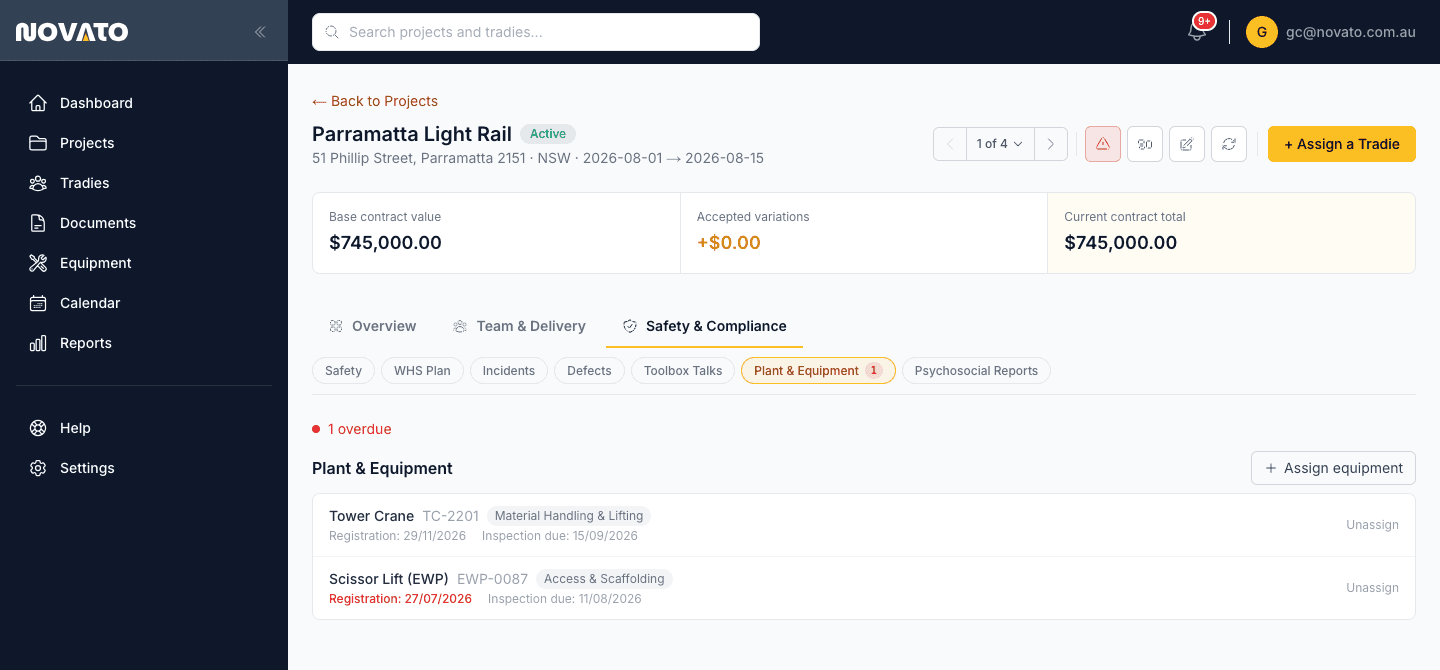
Plant and equipment gets shared across projects, and the register meant to track where it is often lags behind reality. Novato treats equipment assignment the same way it treats a Tradie assignment — a live link between an asset and a project, not a static list.
How it works
Add equipment to your company-wide list
Record the type and category once — an excavator, a scissor lift, whatever plant you actually run. On Pro, upload a registration certificate or a photo of the rego sticker and the fields fill in for you, still yours to check before saving.
Upload proof and verify it once
Attach the registration certificate or inspection report and mark it Verified — your own internal sign-off that someone checked the file against the dates, not a Novato staff review.
Assign it to a project
Pick the project from the list and confirm — the same "Assign to a project" pattern used elsewhere in Novato. The same asset can sit on more than one project at once, each shown as its own badge, since a shared crane or a piece of plant moving between concurrent sites is normal, not an exception.
It shows up on every project it's assigned to
Visible alongside the Tradies and documents already tracked there, on each project it's on.
Book a specific time window against it
Assignment on its own doesn't reserve a time — for that, Bookings sits on top of the same register, so two trades don't need the same crane at once.
How this fits Australian WHS compliance
This module is deliberately an assignment and tracking tool, not a compliance document store — it doesn't ask for or track statutory equipment certifications itself. Where a specific piece of plant needs its own licence or certification (a High Risk Work Licence for crane operation, for example), that's tracked through Novato's licence verification instead.
Common questions
Does this track equipment certifications or inspections?
Not on this page, it tracks which equipment is assigned to which project, and its registration/inspection-due currency. Actually walking through and recording a real inspection (pass/fail per item, with a photo and a linked defect for anything that fails) is a separate module, Inspections, which can target a specific piece of equipment from this same register. Operator licensing (e.g. High Risk Work Licences) is tracked separately again, through licence verification.
Can the same piece of equipment be on multiple projects?
Yes, at the same time — a shared crane or a piece of plant moving between concurrent sites is the normal case, not an exception, and each project it's assigned to shows as its own badge. If two trades need the exact same equipment for overlapping time windows, that's what Bookings is for.
Does uploading a document read the equipment details automatically?
On the Pro plan, yes — upload a registration certificate, inspection report, or a photo of the rego sticker, and the equipment type, category, serial number, and dates fill in for you. Every field stays editable before saving; nothing is auto-verified from the extraction alone.
Who can see the equipment register for a project?
Anyone with access to that project can see what equipment is currently assigned to it, the same as the Tradies and documents sections.
Try plant & equipment register on your next project
Free trial, no credit card required.